
Handling enquiries
Where a guest enquiry lands, what happens automatically, and how to work the list so nothing sits unanswered.
Last updated
Every published property page carries an enquiry form. This is what happens when someone fills it in.
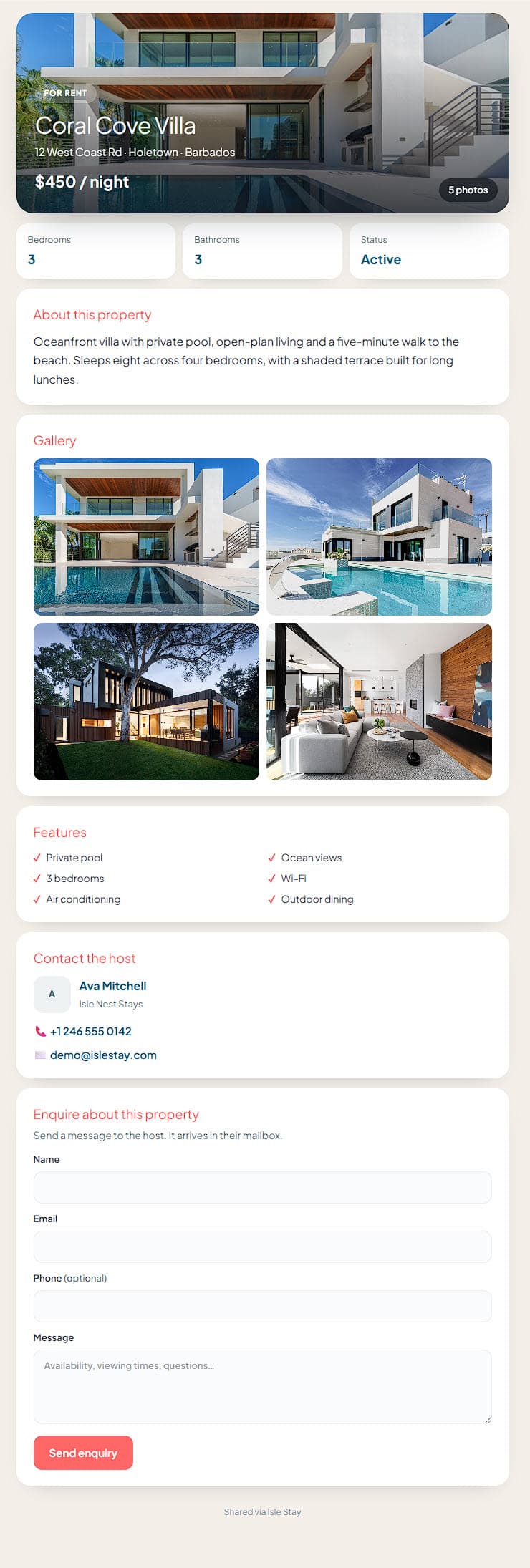
What happens the moment a guest sends one
Three things, immediately:
- A lead is created, attached to that property, at stage New.
- A message is filed, containing what the guest actually wrote.
- You get an email, so you do not have to be logged in to find out.
The lead and the message are two views of the same enquiry. The lead is the person and where they have got to; the message is the conversation.
Leads and Mailbox are on paid plans - Mailbox from Starter, Leads from Pro. On the free plan the enquiry email still reaches you, which is the part that matters.
Why an enquiry might not arrive
Almost always one of these:
The property is still a draft. Draft listings do not accept enquiries at all - the form refuses them rather than silently dropping them. Switch it to Live.
The listing is not public. A property can be live but not published to your public site. Check both.
The email went to spam. Enquiry notifications come from our sending domain, not from the guest's address. Mark one as "not spam" once and the rest follow.
Whatever happens to the email, the lead is already saved. A mail failure never loses an enquiry - open Leads and it will be there.
Working the list
Leads move through six stages: New → Contacted → Viewing → Offer → Won → Lost.
The names lean towards property sales, and they work just as well for rentals: "Viewing" is a video call or a site visit, "Offer" is dates held pending payment. Use them loosely - the point is knowing what you have not answered, not bookkeeping.
Every lead also has:
- Score - a number you set yourself. New enquiries start at 50. It is a manual judgement, not something we calculate. Use it if it helps you sort; ignore it if it does not.
- Source - where it came from. Enquiries from a listing page are tagged
listingautomatically. - Type - a guest, or a buyer if the property is listed for sale.
- Notes - the guest's original message lands here.
The thing that actually wins bookings
Speed, and it is not close. A direct enquiry is usually one of several a guest has sent that evening. The first useful reply tends to win, and "useful" means answering the actual question rather than acknowledging receipt.
Two habits worth building:
Answer with a number. If they asked about dates, say whether the dates are free and what they cost. An enquiry answered with "thanks, I will check" gets overtaken by whoever answered with a price.
Deal with the awkward bit first. If the dates are gone, say so in the first line and offer the nearest thing you have. Burying it under pleasantries wastes everyone's evening.
Common questions
Can I reply from inside Isle Stay? Yes, from the Mailbox on Starter and above. The guest gets it as a normal email.
Does marking a lead Won do anything? No - it is a label for you. Nothing is charged, blocked or booked by moving stages.
Can a team member handle enquiries? Yes, on the Agency plan. Leads can be assigned, and access is granted per section, so someone can work enquiries without seeing billing.
Where do enquiries about a property that no longer exists go? They stay in Leads with the property reference intact. Deleting a listing does not delete the people who asked about it.
Still stuck?
If a guide does not cover it, open Help & Support inside your hub. It comes through with the page you were on and your plan attached, so you can just describe what happened.
Sign in and ask